PLEASE NOTE: this registration process is not required if your organisation will be using a numeric number (either a dedicated number or shared number).
If your organisation wishes to use an alphanumeric SMS name, you will need to register your Sender ID with ACMA. We’ve outlined the steps below;
Step 1: Identify and inform your authorised business contact
Before you can submit and register your sender ID, your business will need to create an ACMA Assist account. This can only be done by someone listed on your ABN as either:
- The Principal Authority, or
- An Authorised Administrator If you do not know who is authorised against your business ABN, we recommend that you start by inquiring with your accounts and/or legal team as they are likely to be able to guide you.
Step 2: Set up your business’s ACMA Assist account
The authorised contact will need two things to proceed:
- A MyID account
- An ACMA Assist account
* We also recommend that businesses add additional users to the ACMA Assist account for future verifications and operations.
Step 3: Follow the steps below to complete the Transmit (also called Kudosity) registration form
Log in to your Transmit SMS Account, in left hand menu choose Senders, then click on Add Sender nutton on RHS. This will take you to the Sender ID Registration Form (further instructions below)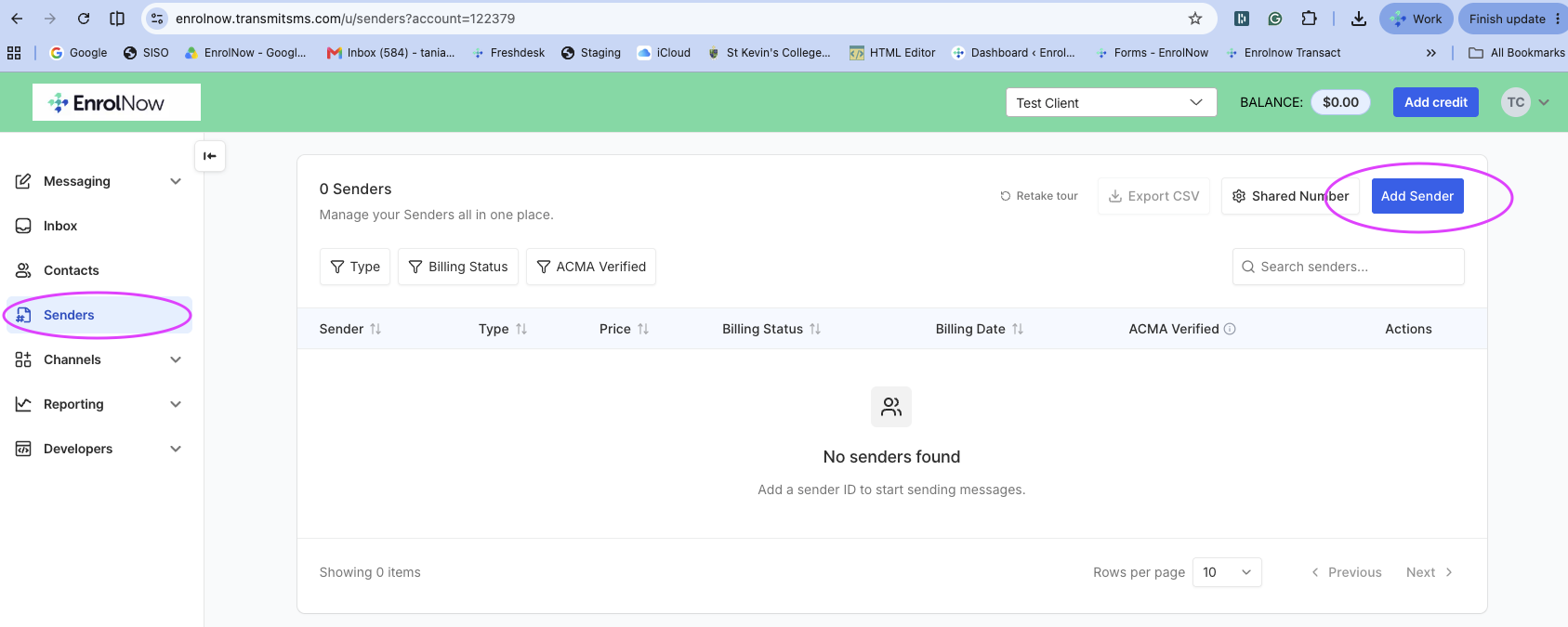
Complete the form with the following information:
Sender ID: select 'I'd like to use an Alphanumeric Sender' & your Requested Sender ID
(eg KinderA)
Business Information: ABN & other company details
Contact Information: This must be a Principal Authority or Authorised Administrator
for your ABN on the Australian Business Register
Opt IN & Compliance: Select Inferred Consent, which will then populate the suggested opt-in steps.
Once you submit your form, the nominated email will receive an email directly from the ACMA with instructions on how to verify the sender ID / Create your ACMA Account if you have not already done so.
If successful, the ACMA will email you to advise you’re registered and you can send verified SMS with your registered alphanumeric Sender ID.
*
Was this article helpful?
That’s Great!
Thank you for your feedback
Sorry! We couldn't be helpful
Thank you for your feedback
Feedback sent
We appreciate your effort and will try to fix the article